 Plimm
Plimm: private AI journal and voice diary. A journal that listens back.
Write or talk. An AI that runs entirely on your phone reads what you wrote and answers it. No account, no cloud AI, no Plimm server. Turn on airplane mode and everything still works.


- Free to start
- iPhone and Android
- Works offline
- No account
- No ads
What it does
A written diary, a voice journal and a companion in one
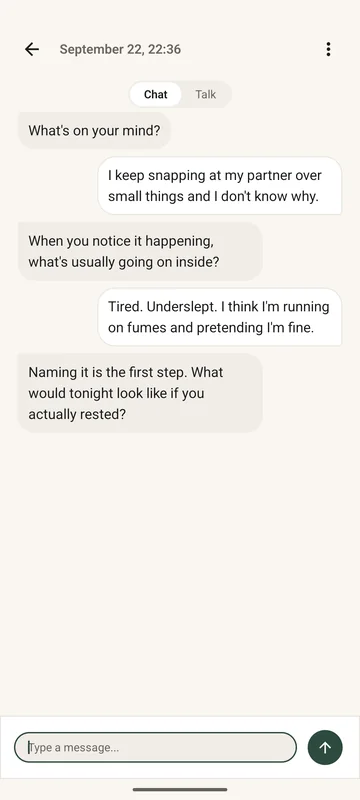
Most journal apps are somewhere to store writing. Plimm reads what you wrote and answers it, and it always makes clear which of the three you are doing.
-
Free writing
A calm page for daily entries. No prompts to fill in and no fields to score.
-
Voice journaling
Speak your entry and Plimm transcribes it on the phone, offline. Recordings are never uploaded or sent to any AI service.
-
Reflective conversation
Talk something through with an AI that has actually read your journal.
-
Insights and patterns
How your mood, themes and energy shift across weeks, written out in plain sentences instead of scores.
-
Crisis support
If your writing suggests you may be struggling, Plimm shows real, immediate help. It never contacts anyone for you.
-
No streaks, no nagging
No badges, no reminders, no guilt for a missed day. Plimm waits until you open it.
Privacy
Private by design, not by promise
The AI downloads to your phone and runs there. Your entries and recordings are never sent to Plimm or any AI service, never sold, and never used to train anyone's models. There is no account to create and no Plimm server that stores your journal.
Most private diary apps ask you to trust a privacy policy. This one you can check: put the phone in airplane mode and keep writing.
The app does send a few things, such as usage events you can turn off in Settings and crash reports. None of them contain your writing. The privacy policy lists every one.
How Plimm's AI works: which models run on the phone, what they do, and how to check it yourself.
Pricing
Free, and Plimm Pro
Free
$0
- Unlimited writing
- One AI conversation a day
- Voice takes up to 0:30
- Your latest insight
Plimm Pro
$29.99 once, no subscription
- Conversations as often as you need
- Voice takes up to 5:00
- Every insight Plimm has found
- Every Pro feature we add later
These are US prices; the App Store and Google Play show the price where you live. Plimm Pro is paid once through the App Store or Google Play, and nothing renews. No ads on either plan.
Requirements
Will it run on your phone?
The AI runs on the phone itself, so it needs a reasonably recent one.
- iPhone
- iOS 26 or later
- Android
- Android 10 or later, 64-bit
- Memory
- About 4 GB of RAM
- Storage
- 1 GB free
- Download
- 437 MB. Wi-Fi recommended.
- Language
- English
Plimm checks your phone before the download. If it won't run well, Plimm says so up front instead of quietly sending your writing to a server.
Does Plimm work without internet?
Yes, once the AI has downloaded. Writing, voice transcription, conversations and insights all run on the phone. You need a connection for the first download and to buy Pro.
Which AI does Plimm use?
Two open models that run on your phone: Qwen2.5-0.5B-Instruct, run by llama.cpp, writes the reflections, and Whisper, run by whisper.cpp, turns speech into text. How Plimm's AI works has the details.
Does Plimm send my journal to ChatGPT or another AI service?
No. The AI runs on your phone. There is no Plimm server, and your entries are never sent to Plimm, OpenAI or any other AI service.
Can the developer read my entries?
No. There is no account and no Plimm server that receives your writing, so there is nothing to read. The privacy policy lists the few things the app sends; none of them contains your writing.
Is Plimm a therapy app?
No. Plimm is a journal with an AI that reflects on what you write. It does not diagnose or treat anything and is not a substitute for professional care. If you are in crisis, Plimm shows the crisis line for the country your phone is in, such as 988 in the US, Samaritans on 116 123 in the UK and Ireland, or Lifeline on 13 11 14 in Australia. More in the disclaimer.
Can I use it without paying?
Yes. Writing is unlimited on the free plan, which also includes one AI conversation a day, 0:30 voice takes and your latest insight.
Where do my voice recordings go?
Nowhere. They are transcribed on the phone and kept there so you can play them back. You can turn recordings off or delete all of them in Settings.
What happens when I get a new phone?
Plimm Pro follows your Apple or Google account. On Android, Plimm is left out of Google backups, so a phone restored from one starts without your journal. On iPhone, your journal is part of your own iCloud backup when iCloud Backup is on, so a phone restored from that backup brings it back. Plimm never receives it either way, and voice recordings are left out of both kinds of backup.
Why is the download 437 MB?
That is the AI itself. One model writes the reflections, the other turns speech into text. Having them on the phone is what lets everything run without a server.
How is Plimm different from Day One, Rosebud or Apple Journal?
Plimm's AI reads what you write and answers it, on your phone, with no account. Rosebud's AI runs in the cloud. Day One's AI features are part of its Gold plan and mostly run in the cloud. Apple Journal runs only on Apple devices, and its guides do not describe an AI you can talk to about your entries. Side by side: Plimm vs Rosebud, Plimm vs Day One and Plimm vs Apple Journal.
Try Plimm free
Writing stays free and unlimited. Plimm Pro is there if you want more.